---
title: ISOPlanner AI Assistent
description: Introduction ISOPlanner focuses on using AI to help users save time and gain valuable insights. Tasks that are hard, tedious or error-prone for humans can
---
[Skip to content](https://docs.isoplanner.app/ai-assistent#main-content)
[](https://isoplanner.app)
Open main navigation
Close main navigation
How can we help you?
- There are no suggestions because the search field is empty.
1. [ISOPlanner](https://docs.isoplanner.app/)
2. [Main Concepts](https://docs.isoplanner.app/main-concepts)
# ISOPlanner AI Assistent
Introduction
ISOPlanner focuses on using AI to help users save time and gain valuable insights. Tasks that are hard, tedious or error-prone for humans can sometimes be better performed with AI. Users are always in control and AI results are presented to them for final decisions.
Safety first
We recognize that AI could potentially a threat to information security. In order to mitigate this threat for us and our customers, we implemented ISO 42001 – AI management systems. We implemented the following controls.
1. We will not use *your data*\* to train AI models.
2. Your data\* is not available to other customers.
3. We only use [Microsoft AI Services](https://learn.microsoft.com/en-us/legal/cognitive-services/openai/data-privacy) in ISOPlanner.
4. Our [privacy policy](https://isoplanner.app/privacy-policy/) and [GDPR compliance](https://isoplanner.app/gdpr/) applies to AI services.
5. Users can see in advance when they activate AI functions. 
6. Use of the AI Assistant can be turned off entirely.
\* *Your data* means data stored in ISOPlanner, data in your Microsoft tenant and prompts and responses to and from AI Services.
Opt-in
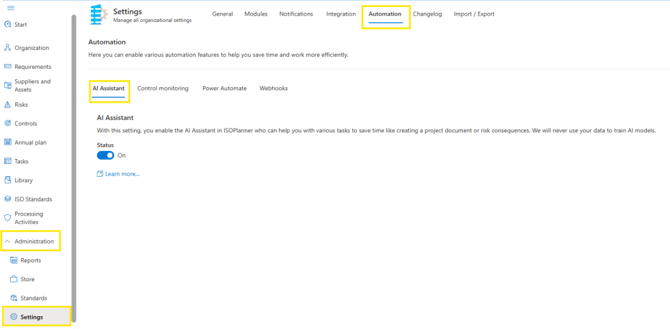
According to Privacy by Default principles, the AI Assistant is turned off by default. Admins can turn it on in the[**Administration / Settings / Automation**](https://portal.isoplanner.app/admin/settings/automation) tab.
AI Features
> Some feature may not be available for Basic subscriptions.
This list will grow in the future. Any suggestions are welcome, please create a support ticket with your ideas.
#### **Creation of a project plan:**
During the 30-day trial period, you can create project milestones based on the standard(s) of your choice and the status of your implementation. AI Assistant can create a project for you, which you can also download after it is created.
***Example of creating a project plan***
**Risks:**
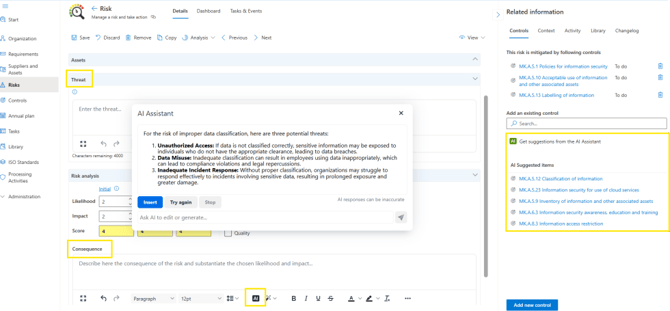
Within the risk menu, AI assistant can help you defining “Risk threats” and “Risk consequences” for each of your risks. Within the “related information” on the right side, the AI Assistant is able to suggest controls that can mitigate the selected risk.
***Example of editing a risk with AI features***
#### **Processing Activities:**
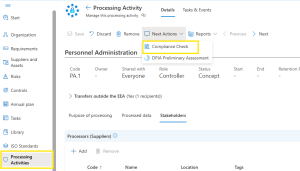
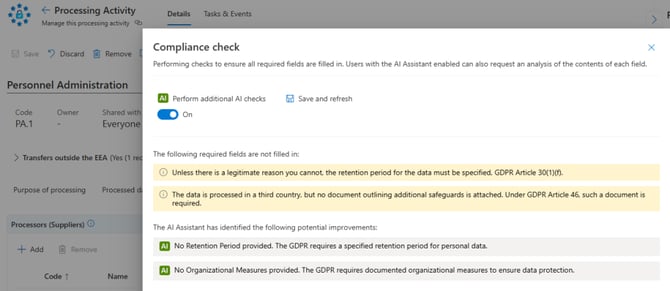
Our AI Assistant helps you standardize your way of working by smart checking of duplicate values for retention periods, data subject scale and many more. It can detect for example that retention ’14 days’ is the same as ‘2 weeks’. **GDPR compliance check**. GDPR can be complicated when working with joint controllers, different roles and special personal data. In the Processing Activity module, our AI assistant checks your processing activity against the GDPR and gives advice how to improve.
***Example of compliance check in “Processing activities”***
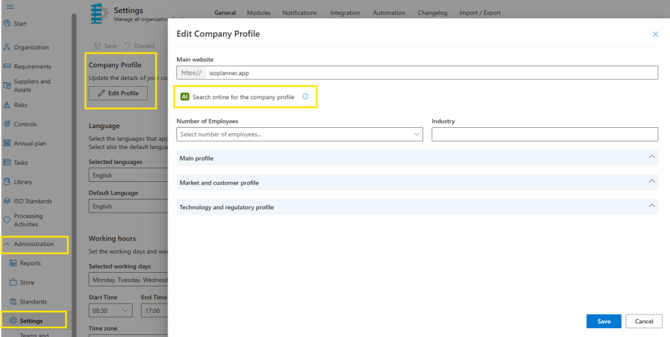
#### **Company profile:**
In the menu Administration / Settings / tab: General, you can let our AI Assistant gather a public profile of your company. This can give valuable insights when starting to implement compliance frameworks.
***Example of “Company profile”***
#### **Annual Plan:**
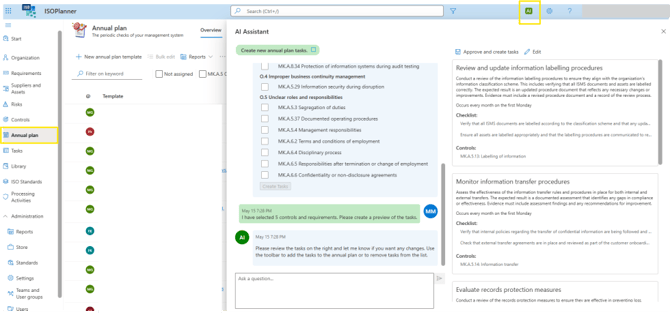
AI assistant helps you create monitoring tasks, based on the highest risks and controls linked to them. You can choose only some of the suggested ones. You can also have a chat with the AI assistant (such as suggest changes) to make sure you get the expected results.
***Example of “Annual plan”***
#### **Library:**
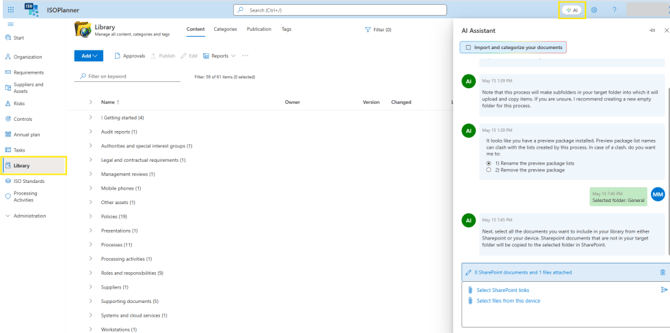
With the help of AI Assistant, you can reorganize your document in SharePoint and in ISOPlanner. If you have a preview package activated, we advise to deactivate the package as it might cause confusion. Following, you can choose documents from your SharePoint which you wish to organize and/or upload document from your local storage. First step is to choose the folder on your SharePoint which you wish to organize. Upon confirmation of the suggested folders, AI assistant will create new folders in your SharePoint and sort out the documents.
Note: AI Assistant can be used by one (management) user at a time. Documents which can be organized with help of AI Assistant are Microsoft documents (word, pdf, excel) however not SharePoint Pages or SharePoint Lists.
***Example of “Annual plan”***
Resources
- [How to work with risks](https://docs.isoplanner.app/risks/)
- [Settings – Automati](https://docs.isoplanner.app/settings-automation/)
- [Getting Started](https://docs.isoplanner.app/getting-started)
- [Main Concepts](https://docs.isoplanner.app/main-concepts)
- [Common Elements](https://docs.isoplanner.app/common-elements)
- [Administration Menu](https://docs.isoplanner.app/administration-menu)
- [FAQ](https://docs.isoplanner.app/faq)
- [Videos](https://docs.isoplanner.app/videos)
- [Apps & Add-ins](https://docs.isoplanner.app/apps-add-ins)
- [Automated Control Monitoring](https://docs.isoplanner.app/automated-control-monitoring)
- [Developer](https://docs.isoplanner.app/developer)
- [Power Automate](https://docs.isoplanner.app/power-automate)
- [Power BI](https://docs.isoplanner.app/power-bi)
- [Release Notes](https://docs.isoplanner.app/release-notes)
- [Transition Guides](https://docs.isoplanner.app/transition-guides)
[](https://docs.isoplanner.app/)
[mailto:support@isoplanner.app](mailto:support@isoplanner.app)
Copyright © 2026, ISOPlanner
```json
{
"@context" : "https://schema.org",
"@type" : "VideoObject",
"contentUrl" : "https://147381408.fs1.hubspotusercontent-eu1.net/hubfs/147381408/video_assets/432530620653/inherited/web_optimized.mp4",
"dateModified" : "2026-07-06T11:57:11.453Z",
"duration" : "PT22.783S",
"height" : 720,
"name" : "ai_assistant_-_project_document_v1 (720p)",
"thumbnailUrl" : "https://147381408.fs1.hubspotusercontent-eu1.net/hubfs/147381408/ai_assistant_-_project_document_v1%20(720p).mp4/medium.jpg",
"uploadDate" : "2026-07-06T11:40:06.943Z",
"width" : 1280
}
```