
Overview
This article covers the steps to take before getting started with ISOPlanner: booking a demo, setting up a subscription, granting the right permissions, checking general settings, and activating framework. Working through these steps gets an ISOPlanner environment ready for implementation.
View a demo
Live demo – Booking a live demo is the fastest way to get answers, whether that's before subscribing or partway through a trial. A 45-minute session covers specific questions and shows the features that matter most. Book a personal demo.
Prerecorded demo – A best practice would be to watch the prerecorded demo first when time is limited. It gives a quick first impression of ISOPlanner. Watch the prerecorded demo.
Start a subscription
A few things to consider when starting an ISOPlanner subscription.
Management users
ISOPlanner subscriptions are based on the number of management users. A management user has full permissions within ISOPlanner. Each management user includes a set number of standard users — the exact number depends on the subscription type.
Subscription type
ISOPlanner offers three subscription types: Basic, Business, and Premium. These differ in available features, such as KPI management and Power Automate monitoring.
The NIS2 Quality Mark is one of the frameworks that can be activated within these subscriptions. More on that in NIS2 compliance.
Payment method and subscription duration
A subscription can be monthly or annually, paid by credit card or invoice. Invoice payment is only available for annual subscriptions.
-
Monthly subscription
Monthly subscriptions are paid by credit card and need to be started by the customer. This is done in ISOPlanner via Administration / Subscription, where the subscription type, duration, and number of management users are selected.
-
Annual subscription
Annual subscriptions can be paid by credit card or invoice. For invoice payment, it is advised to contact support at support@isoplanner.app — the subscription is then set up and the invoice sent.
Changing the subscription
The subscription type or number of management users can be changed at any time. For credit card payments, these changes can be made by the customer, directly in the menu Administration / Subscription; the support team can also help, reach out to support@isoplanner.app.
More on subscription types and included features: Pricing.
Grant ISOPlanner permissions
ISOPlanner integrates with Microsoft 365 and needs authorization to access the Microsoft 365 tenant.
This integration makes it possible to link SharePoint documents to ISOPlanner and view them directly in the platform, and to add users from the Entra directory.
Existing SharePoint permission settings stay unchanged — ISOPlanner only shows documents to users who already have access based on the permissions set in SharePoint.
More on this topic in: Settings – Integration.
Access authorization is not required during the trial period.
General settings
The menu Administration / Settings / General holds the general settings for an ISOPlanner environment: default language, audit cycle, company logo, and more. Details on each option: Settings – General.
Activate frameworks – buy a content package
ISOPlanner currently offers more than 50 frameworks ready for activation. A framework not yet listed can usually be added within a few weeks — it is advised to contact support for details on a specific framework.
Frameworks are activated or deactivated via Administration /Frameworks. The number of framworks available depends on the subscription type.
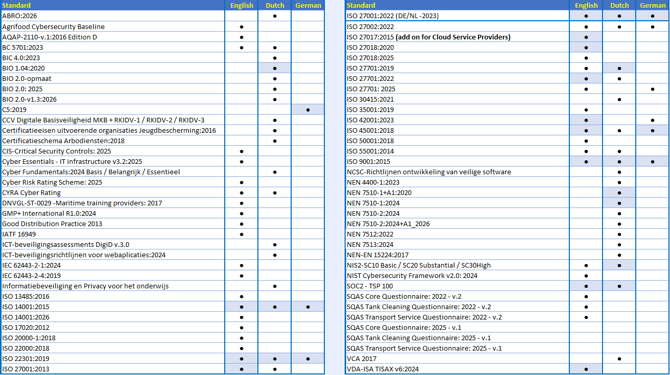
Consider using an Instant 27001 content package to get started quickly and save months of work. These one-time-purchase packages use ISO 27001 as the base, with optional add-ons for other frameworks, and include ready-to-use documentation, risk registers, and annual planning. Packages are ordered via Administration / Store. In the table below, blue fields mark the frameworks available as Instant add-ons. More details: Starter package, or contact the support team.
The table below provides an overview of all frameworks available in ISOPlanner and the languages in which they are offered.
Resources