
Introduction
ISOPlanner is a Compliance Management Solution that helps you implement and maintain your compliance frameworks with the purpose of having a smooth and efficient audit.
Some of the features which will help you move away from Excel documents are:
- Activate multiple compliance frameworks and de-duplicate requirements and controls;
- Create assets and risks and manage your supply chain;
- Create Processes and Objectives, create KPIs for them and monitor KPI results on real-time dashboards;
- Manage recurring and one-time tasks while letting your colleagues handle them in Outlook and Teams;
- Create a good structure in your library for documents, evidence and all relationships between them.
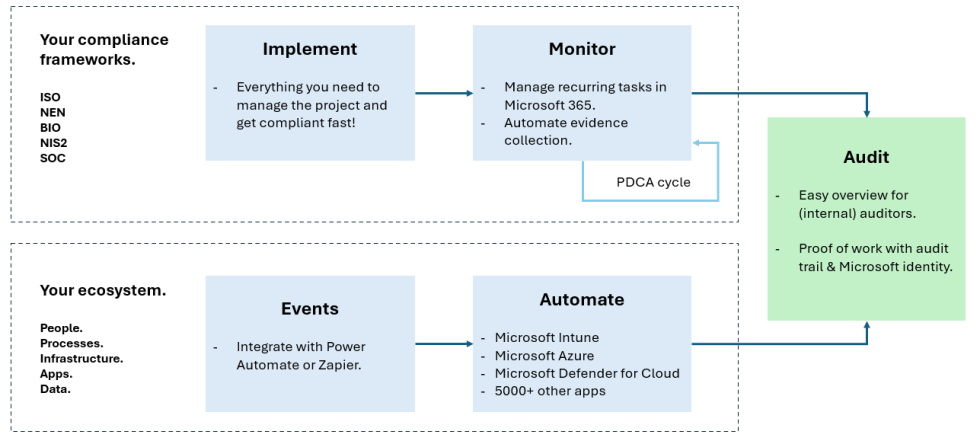
ISOPlanner is the only solution that is fully integrated in Microsoft 365. If you have Microsoft 365 and need to implement compliance framework(s), ISOPlanner gives you the maximum value:
For end users:
- Log in with your Microsoft account;
- Use Outlook and Teams to handle your tasks;
- Use SharePoint to safely store your documents and evidence;
- Create reports in Word, Excel and PDF;
- Gain knowledge about your policies and compliance in general in SharePoint and/or Teams.
For managers:
- Connect with Microsoft Entra ID to create dashboards for specific Teams.
- Use Power Automate to collect evidence.
- Start processes by triggering a Power Automate workflow.
- Use Power BI to create custom reports.
- Can connect to Intune, Azure, Defender and many more apps in your ecosystem.
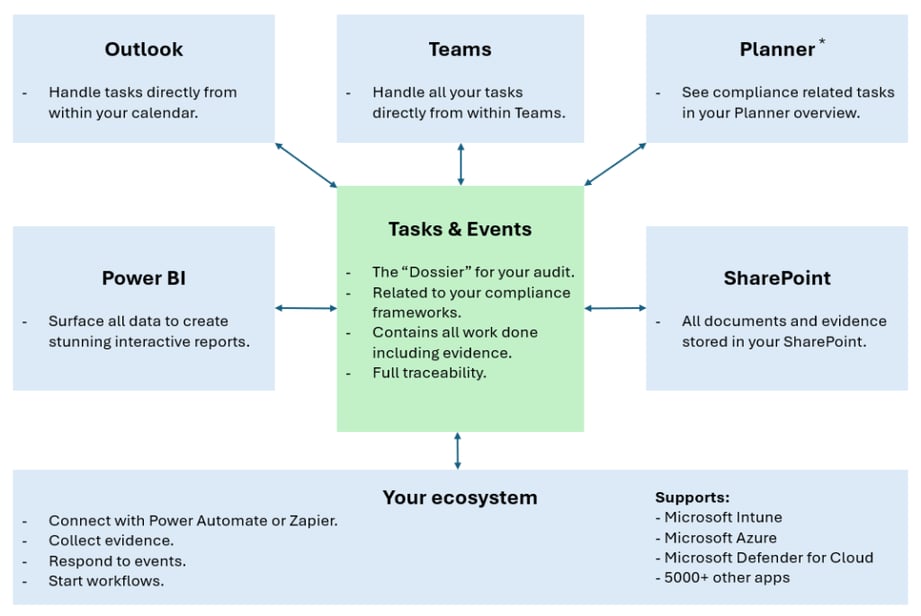
*) Zapier is in active development.
Next to this, ISOPlanner has a lot of features to help you get compliant fast.
- A store that offers many starter packages with pre-defined templates, configuration and knowledge. You can create a complete configuration in ISOPlanner with a few clicks;
- ISOPlanner is a simple solution that users can easily understand and use. It looks familiar like Microsoft 365 and almost no training is needed;
- A powerful task system that helps you set-up your project fast and involve your colleagues in Outlook and Teams;
- Powerful approvals to get your compliance documents approved fast through SharePoint, Teams and mobile;
When this is not enough, here are some more highlights 😉
- A robust role based access control system that can create custom roles, sharing permissions and synchronize users and groups with Microsoft Entra ID;
- A great ‘annual plan‘ in which you can easily get an overview of the monitoring progress of the whole year;
- Create custom forms with fields (like number, text, date/time and choice) and use it for a supplier assessment (and many more);
- Publication enables you to send documents to groups of users and with their confirmation they have read it you have a document read confirmation per user, document or group of users.
Resources