User interface change: headers
Items like Requirements have a header which shows you basic information about the item. Previously, that information was always presented as editable fields. Now to provide a cleaner look, the information is shown read-only at first. with the option to switch to ‘edit’ mode.

User interface change: foldable panels
Related information now folds in- and out.
The menu can also be made to fold away to the left, and then come back when you hoover over it.
User interface change: menus ‘Management’ and Administration’ are merged
The ‘Management’ menu area used to be seperate from the ‘Administration’ menu area. Now they are combined, where you see underlying menu options based on your role.
New feature: Organization administrator role
For customers on our premium plan, who have access to multiple Organizational Units, a new ‘Organization administrator’ role is created. People with that role have Administrator access to all Organizational Units.
New feature: License manager role
If there are people in your organization who need to manage ISOPlanner licenses but don’t need other access to content in ISOPlanner – for example to risks or an overview of tasks – then you can now assign a free License manager role to them.
New feature: move and import Organizational Units
For customers on our Premium plan, there is now the option to move Organizational Units to another place in the hierarchical structure.
Also you can now import the contents of one Organizational Unit to another one.
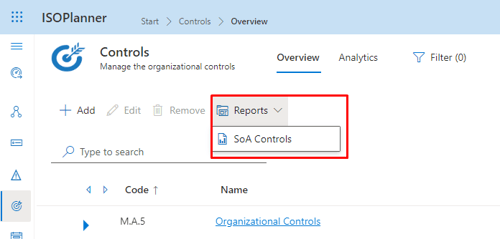
New report: Statement of Applicability for a custom control set
Apart from the Statement of Applicability specifically for ISO 27001 you could generate before, there’s now also the option to generate a Statement of Applicability for any filtered list of controls.
Find this report in the Controls menu.