New Assets module for Business and Premium plans
For Business and Premium plans, there’s a new ‘Assets’ module.
This video shows how to deal with assets in all ISOPlanner plans, including Basic:
https://isoplanner.app/videos/assets/
The new feature allows for identifying types of assets and linking them to risks. Each asset type can have a list of specific assets in SharePoint. Assets can be classified and in Premium it’s possible to identify how those assets relate to each other.
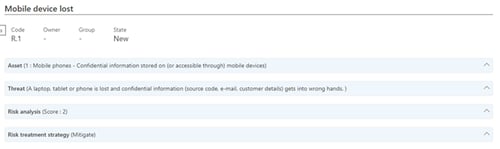
User interface change: risk view
The Risk view was improved to be cleaner and show more information without scrolling. For all aspects of the risk a summary is shown which can be expanded for more detail.
More than one reason for applicability for controls
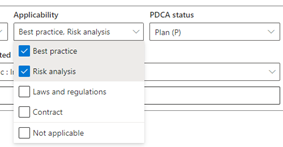
When selecting the reason for applicability for a control, it’s now possible to select more than one option. This will also show on the generated Statement of Applicability (in menu Administration – Reports).
New option to sort the Annual plan
The Annual plan is now sorted on the date of the oldest open task, to make sure that the tasks which are due first are shown on top. Click on any column header to change the sorting of this overview.
Add your own logo (Premium)
For customers on our Premium plan there is the option to upload your logo, which will be shown in the top left corner of ISOPlanner.
Go to menu Administration – Settings to upload your logo.