New features in release 3.0.7
- Easier navigation for Requirements and Controls.
- Classification groups in the risk overview.
- Renamed Risk Chance to Risk Likelihood.
- Extended number of widgets per dashboard to 8.
- Implemented a smoother transition between lists and details.
- Replaced the activity panel on the dashboard with a better widget.
In the next release we are implementing more reports, more usability improvements and we are starting some exciting new larger features. We also continue to provide more automation support, use cases and examples.
Easier navigation for Requirements and Controls
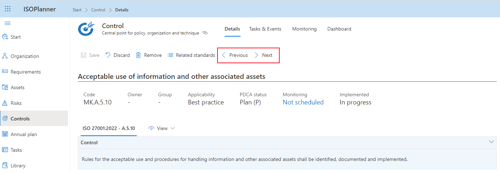
In the detail views for Requirements and Controls, we added buttons ‘Previous’ and ‘Next’ to easily navigate through the hierarchies. For example, when Requirement 6.1.3 is selected and you press Next, 6.2 is shown. Previously, you needed to navigate to the parent (6.1) and select 6.1.3.
Classification groups in the risk overview
In the list with all risks, we added a column ‘Classification groups’. You can edit these groups for each risk individually and now you have an overview of them in the list as well. We added also a filter so you can easily filter risks on, for example, ‘Availability’ or ‘Confidentiality’.
Renamed Risk Chance to Risk Likelihood
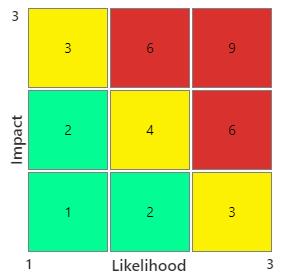
We renamed the fields ‘Chance’ in the Risk views to ‘Likelihood’. This term is better recognized in risk management.
Extended number of widgets per dashboard to 8
The maximum number of widget per dashboard is increased from 6 to 8.
Implemented a smoother transition between lists and details
When you see a list of risks, controls, processes, objectives or requirements and navigate to the details of an item in the list, the transition to the details is a bit smoother with a spinner and a nice fade-in. This is also applied to the new Previous / Next buttons for Requirements and Controls. We hope that the experience is now a bit more calm.
Replaced the activity panel on the dashboard with a better widget
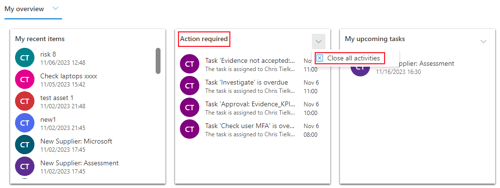
On the dashboard, we had a panel on the right with all activities. We analyzed usage and user experience and came to the conclusion that this panel did not do what we wanted: to give you an easy overview for important actions. We also have the widget ‘Action required’ which showed a few of these activities. We removed the panel in favor of the widget in which we made the following improvements:
1. When you scroll down, more items are loaded automatically.
2. The tooltip on each item is improved with clear title and text.
3. We added a menu to the widget in which you can close all activities at once.
4. Duplicate activities are removed.