New features in release 3.2.5
- New Power Automate Workflow capabilities.
- Approval workflows in Power Automate.
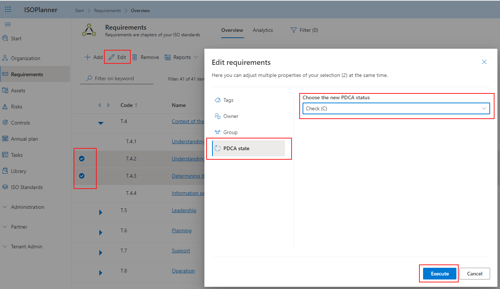
- Bulk edit of PDCA status of Requirements and Controls.
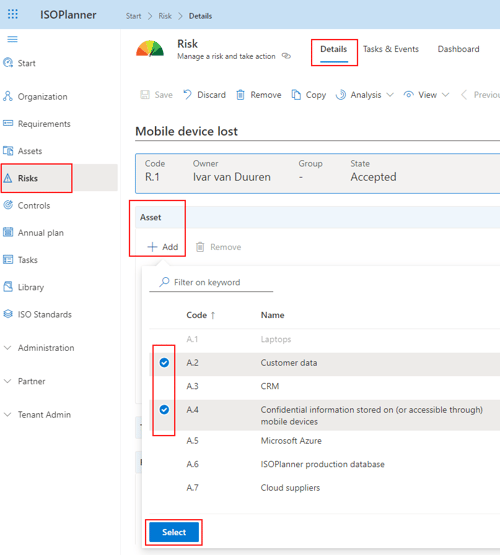
- Multi-select of Assets for a Risk.
- Consistent and more readable Date format.
- New Annual Plan filter for Standards.
- Improved sorting in Context tabs.
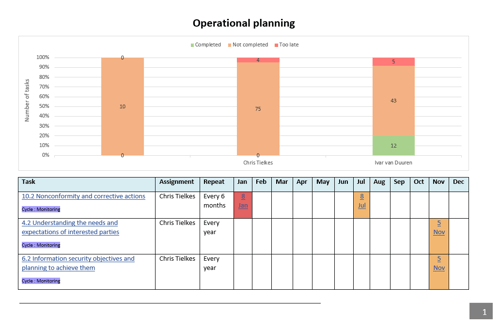
- Report Operational Planning now available on tab All Tasks.
New Power Automate Workflow capabilities
Our Power Automate Connector has been certified by Microsoft! This means the Connector is now publicly available in the Microsoft Power Automate Store and free of use. Please check our new Tutorials to learn the basics and to create awesome flows :-).
Approval workflows in Power Automate
It was already possible to use Approvals in ISOPlanner. Now you can also use an Approval template and create a workflow in Power Automate for it. We have created an easy-to-use template for SharePoint pages and documents for you. The template is freely available in the Microsoft Store. Please check our Tutorial how to set it up.
Bulk edit of PDCA status of Requirements and Controls
In the past, you could update the PDCA status of a Requirement or Control and all childs in the hierarchy where also updated. We improved this behavior and now you can select the Requirements and Controls you want and click Edit. Choose the PDCA status tab and select the new status.
Multi-select of Assets for a Risk
When adding Assets to a Risk, it is possible to select multiple assets at once.
Consistent and more readable Date format
We changed to display format of Date to include the short textual representation of Month in your local date format.
For English the format is for example: Nov 5, 2024
Especially for tasks, our users indicated that this format is more readable and prevents confusion between day and month.
New Annual Plan filter for Standards
In the Annual Plan, you can now filter on Standards. This is very handy when you have configured monitoring for multiple standards. When the filter is enabled, only tasks are shown that are linked to requirements or controls of these standards.
Improved sorting in Context tabs
All Context tabs for Risks, Assets, Tasks and so on are now sorted on the type of entity and code of entity. Also when you search for new entities, this sorting is applied.
Report Operational Planning now available on tab All Tasks
In the All Tasks overview, you now can start the report Operational Planning when the view is set to Schedule. The report is dynamic in the sense that you can filter the tasks and start the report.