We are happy to say that ISOPlanner 3.3.0 has successfully gone live. We added new features and some minor bugs have been fixed.
Please let us know if you have any questions or remarks! You can do this with the “Create a ticket” option accessible with the question mark icon in the top right corner of ISOPlanner.
New features in release 3.3.0
- Bulk editing of Assets.
- Risk treatment strategy available in overview of risks.
- New dashboard widget for tasks and a tag group.
- Group added to various reports.
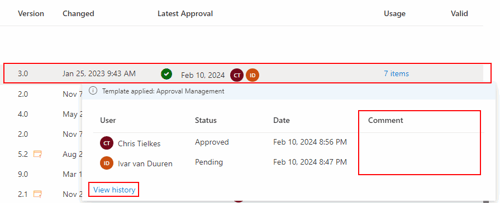
- Approval comment en history available in ‘latest approval’.
- Various usability improvements.
Bulk editing of Assets
You now can select multiple assets and change the owner and tags. If you need more properties of assets to edit, please create a support ticket for it.
Risk treatment strategy available in overview of risks
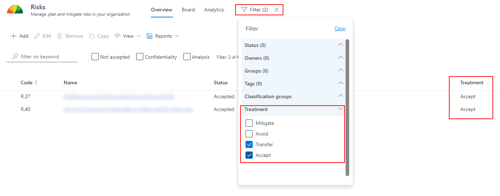
In the risk overview, a new column is added to show the risk treatment strategy (mitigate, avoid, transfer or accept). You can also filter on these values and the column is also added to the risk treatment report. If you don’t want to see this column, you can hide it from view by clicking View/Select columns.
New dashboard widget for tasks and a tag group
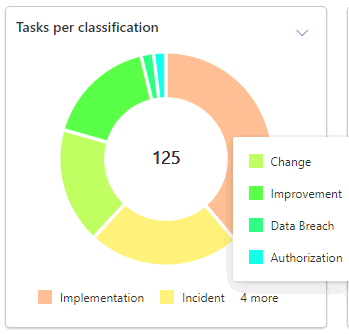
We added a new widget that you can use on dashboards. It shows the number of tasks for each value in a tag group. Let’s say you have the tag group ‘Priority’ with values ‘High’, ‘Medium’ and ‘Low’. The widget shows the number of tasks for each value in a pie chart. You can also only show open tasks.
Group added to various reports
The ‘group’ property is added to the following reports, next to the ‘owner’.
1. Risk treatment plan
2. Requirement details
3. Control details
Approval comment en history available in ‘latest approval’
When you hover with your mouse over a ‘latest approval’ in the Library or Approval module, you now directly can see the comment that the user made for this approval, if any. As a reminder, the ‘Approval comment’ is a KPI for which all data can be analysed using the Organization/KPI module. Also, when you use a Power Automate workflow to handle approvals, the comment given in the Microsoft Teams Approval app is automatically synced with this field.
Next, we added a handy link at the bottom ‘View history’ to directly view all approval history for the selected document.
Various usability improvements
We implemented various usability improvements that were requested by you. Many thanks and please keep creating tickets for things you like to be added or improved 😊.
1. Improved the input of time values. You no longer have to enter the colon (:) so entering 1215 would autmatically be converted to 12:15.
2. Improved the Administration/Standards view. Added toolbars and search functionality that are consistent with other view.
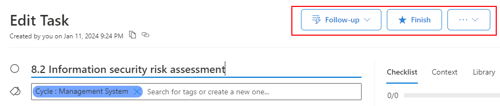
3. We styled the toolbar in all Task view.
4. The requirements and controls are a bit better sorted in the hierarchy and Statement of Applicability (SoA) for some cases where there where multiple standards involved.
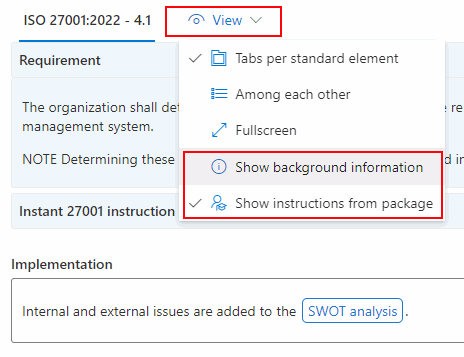
5. Added to options in the View menu for requirements and controls to hide the package instructions and background information. These settings work on a personal level.
6. When a control is fully implemented, the text of the ISO control and Instruction texts are collapsed by default so that the focus is on the Implementation field.
7. For custom standards, we now show the names of these custom standards in the view for linked requirements and controls.