New features in release 3.6.0
- Microsoft Power BI integration.
- Possibility to link the implementation of requirements and controls in organizational units.
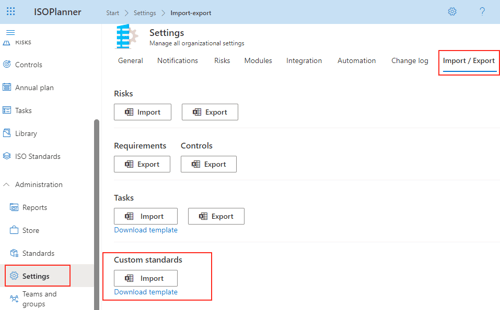
- Import of custom standards.
- Custom standards do not count towards the max of your subscription.
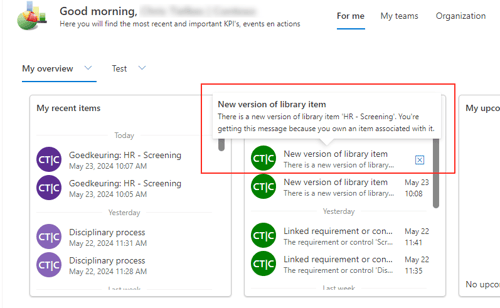
- Notifications to owners of library items.
- Task opened from Planning tab opens in new window.
- Organization time zone.
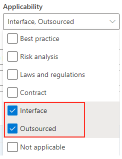
- 2 new applicability reasons for controls.
Microsoft Power BI integration
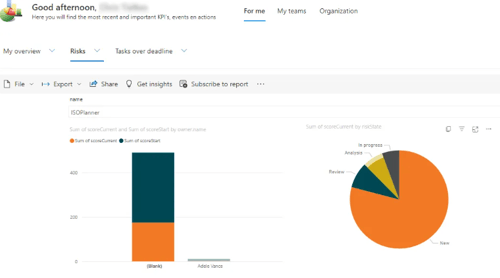
With a Business or Premium subscription, you can now create interactive Power BI reports and use them as ISOPlanner dashboard!
More than 60 data tables and 400 data fields are available for you to create stunning reports!
Please read all about it at our knowledge base.
Possibility to link the implementation of requirements and controls in organizational units
With a Premium subscription, the implementation of requirements and controls in an organizational unit can be shared with other organizational units.This can be useful, for example, when you have a centralized your HR processes in one organizational unit and want to share this with your IT department in another organizational unit. Instead of copying the controls for IT, you now can link them, saving work and keeping the owners of the controls up to date through change notifications.
Import of custom standards
It is now possible to import custom standards using Excel. First, download the template. Check the comments on each field in the template for guidance and import for example special contractual agreements for your customers.
Custom standards do not count towards the max of your subscription
Until now, the number of custom standards you created did count towards the maximum allowed number of standards in your subscription (Basic = 2, Business = 4, Premium = Unlimited). We changed this so you can now create an unlimited number of custom standards. This allows you to, for example, import custom standards for your customer contractual requirements. We would love to hear about your use cases!
Notifications to owners of library items
When a new document version is approved though ISOPlanner, the owner of the document, as registered in ISOPlanner, is now notified through the ISOPlanner dashboard. This is also the case for owners of the same document in other organizational units so this works perfectly together with the new feature “Link the implementation of requirements and controls in organizational units” to keep owners informed of changes.
Task opened from Planning tab opens in new window
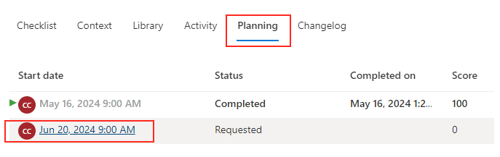
When you open a task that has a recurrence pattern, a tab ‘Planning’ is available, listing all tasks in the pattern (which are created so far). When you previously clicked on a task, the task details where loaded in the same window. We made the user experience more clear by opening the task in a separate window.
Organization time zone
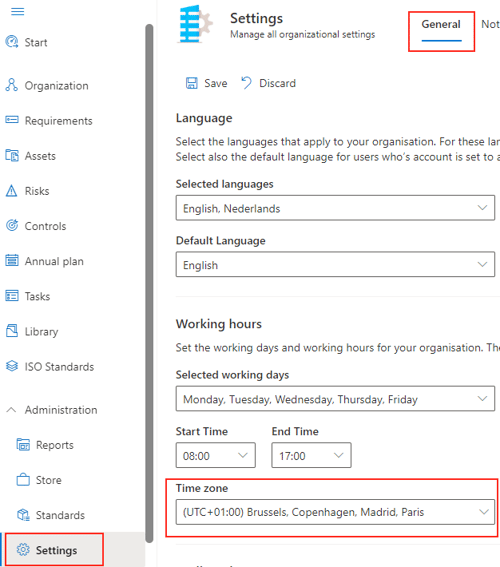
A specific time zone can now be set for the whole organization and per user.
We recommend to set the time zone for your organization when you use Outlook integration or Power BI reports. This allows Outlook to set the correct time zone on scheduled appointments and allows Power BI to set Date/Time values in your local time.
* The setting for the whole organization can be found in Administration / Settings / General.
* The setting per user can be found in Administration / Users -> Edit
2 new applicability reasons for controls
We added 2 new applicability reasons, useful for standards like the Dutch NEN7510 and more.
* Interface
* Outsourced