
New features in release 3.8.0
- The Asset module is now also available for Basic subscriptions.
- The Objective module is now also available for Basic subscriptions.
- Supply chain management for Business and Premium subscriptions.
- Automating compliance: Continuous Monitoring.
What’s next
- Role based access control
- Share with everyone or only specific roles and groups
- Sharing applies to most entities like processes, risks and tasks
- Automatically synchronize Microsoft Entra ID groups
- Global search
- Search anything from the top bar.
- Project management
- Quickly setup and manage new projects like implementing a new framework.
- and many more 🙂
Important notice!
Last year, we introduced the functionalities for Approvals, Workflows, KPIs and Forms. We made this functionality also available for customers with a Basic subscription until June 2024 for free. We’re happy to see that so many customer love these features, especially the Approvals! But, this also means that we are going to remove these features from the Basic subscription. In this release, the KPIs, Forms and Events have been removed. The Approvals feature will be removed next week. When you have a Basic subscription, you have received a separate email from us about this topic.
The Asset module is now also available for Basic subscriptions
The Asset module gives you functionality to register your assets, including their Classifications (e.g. Quality, Availability, Confidentiality). Most (risk based) compliance frameworks require that you classify your assets.
For example, you can create an asset ‘Laptops’, assign a confidentiality label ‘Internal’ and link it to the risk ‘Device lost’ and mitigate that risk through Controls in which you enforce your policy for ‘Internal’ data classification.
The idea is that you do not create every asset but group them into categories that you should handle differently based on your compliance needs.
Assets have a set of standard properties like owner, status and type and can be assigned to 1 or more compliance frameworks, risks and processes. We also have 2 reports available for showing asset details and showing the cumulative risk of assets. This last report requires you to link your assets to risks.
To start using the Asset module, create new assets based on the textual representation of your assets in your risk register. For example, you may have a risk ‘Mobile device lost’. When you open this risk, you see the textual representation of the asset. Click on the button ‘Convert description to Asset’. This easy start gives you more structure for your assets and you can enter more details later.
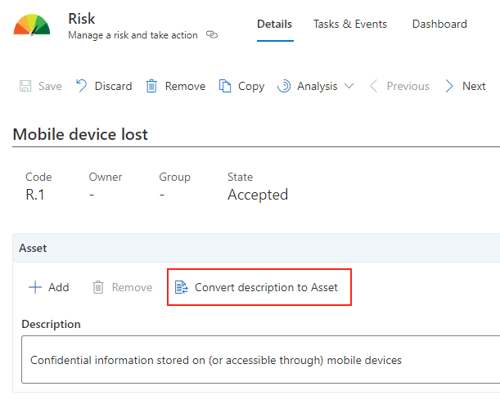
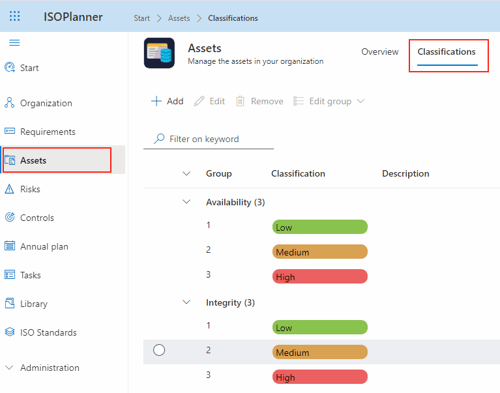
The Asset module also comes with pre-defined Classifications. You can change these classification groups and their labels. For more information on this module, please check our knowledge base here.
The Objective module is now also available for Basic subscriptions
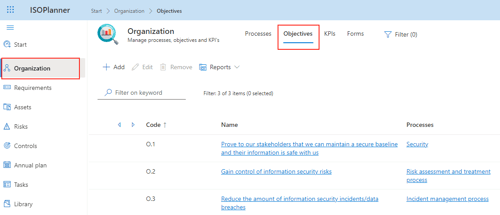
The Objectives module gives you functionality to register and control your objectives on an organizational level. You can create a hierarchy of objectives and link them to processes, risks, controls, requirements and KPIs (Business & Premium subscriptions). You can create tasks in the context of an objective for planning and realization. Each objective has also a dashboard where you can add widgets that show relevant data like related progress or incidents.
Maybe you currently have a document with your objectives. You can copy them to this module and start monitoring your objectives more easily.
You can read more about Objectives in our knowledge base here.
Supply chain management for Business and Premium subscriptions
The Asset module is extended with supply chain management features. This topic is important because supply chain weakness is one of the greatest security risks for any organisation. Also, the new European NIS2 framework contains requirements on how to manage your supply chain.
At a conceptual level, we consider a supplier as a special type of asset. You now can create a hierarchy of assets and add your suppliers in this hierarchy. A supplier can have linked documents like a contract, SLA or DPA. A supplier can also have linked tasks for the (annual) assessment. Note: Consider to use the KPIs and Forms feature to create an internal supplier assessment questionnaire.
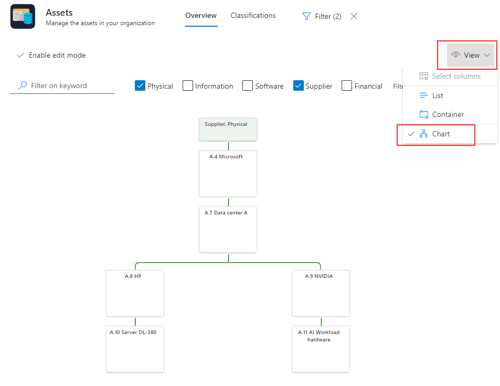
For each supplier, add the products and/or services (assets) that they provide to your organisation. To create this hierarchy, create a product and select the suppliers (‘Containers’) where the asset should be placed in. When the container(s) are selected, the product is shown below the selected suppliers in the hierarchy.
We also added a new ‘smart’ diagram view which can be filtered to visualize chains in the created hierarchy. Because an asset can be in multiple locations in the hierarchy (e.g. customer data can be stored in the data center but copies might be on laptops), the diagram will automatically adjust for this.
For more information on how to use the supply chain management features, check our knowledge base here.
Automating compliance: Continuous Monitoring
With the introduction of Power Automate feature we took a huge step towards automating compliance. Together with our partners, we are busy expanding the ecosystem with templates and tutorials. Microsoft has certified our new ‘Power Automate connector’ which enables you to:
1. Trigger workflows when an annual plan task starts.
2. Submit evidence gathered from external sources to your KPIs.
3. Trigger workflows when tasks/events are created, updated and deleted
4. Trigger workflows when risks are created, updated and deleted.
In the next example we have create a fairly simple workflow that triggers every week in the annual plan. The goal is to check whether all users in Microsoft Entra ID have their MFA enabled. It reports back any users that have MFA disabled. When this is the case, an incident is created automatically and routed to the owner.
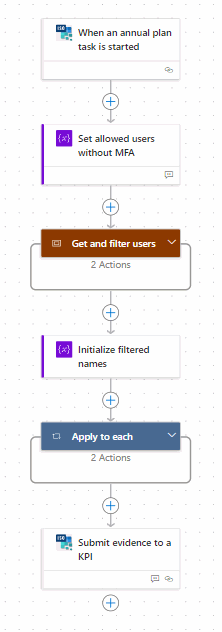
This means that you now implement Continuous Monitoring of your management system, saving hours of manual work. Please check our knowledge base on how you can submit evidence.
Please contact us if you have a use case where we can help you with. We also can bring you into contact with one of our (technical) partners. In the coming period, we will publish more use cases and tutorials in our knowledge base.