New features in release 4.0.0
- Role based access control (RBAC).
- Authorization
- Microsoft Entra ID synchronization of users and groups
- Custom roles
- Report output format in Microsoft Excel.
- Risk report with changes in a certain period.
- Task assignment improvements.
- Everyone can assign tasks.
- Tasks can be assigned to multiple users (teams).
- Tasks have an owner.
- Task view improvements.
- Improved tag filters for tasks.
- Management of Classifications has moved to Settings.
- Approval for owners.
What’s next
- Global search.
- Search anything from the top bar.
- Many improvements that you requested.
- Keep it coming 😉
- Microsoft Planner.
- View your tasks in Microsoft Planner.
- Microsoft Copilot.
- Please let us know what you want to do with Copilot and ISOPlanner. We’re happy to discuss your business case.
Role bases access control (RBAC)
1. Authorization
With this new feature you can define who can see, update and delete standards, processes, risks, tasks and more. By default, no changes have been made to the current authorization. This feature is available for Business and Premium subscriptions and allows you to involve more people in your organization who are responsible for their own processes and risks for example.
Contact us for volume discounts if you want to add management licenses for extra groups of people. For more information check our knowledge base.
2. Microsoft Entra ID synchronization of users and groups
For Business and Premium subscriptions, we added Microsoft Entra ID synchronization for your teams, groups and users. When enabled, this allows you add new employees to a Microsoft Entra ID group and they will automatically get the permissions that you set-up in ISOPlanner. For more information, check this article.
3. Custom roles
For all customers (also with a Basic subscription), you can now create custom roles, choose the members, and assign roles as owners in many places, making user management more easy. All places except tasks where you could choose an owner (e.g. risks and assets) now also accept a custom role.
Report output format in Microsoft Excel
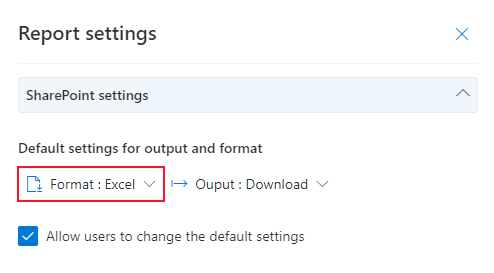
It is now possible to choose the Excel output format for all reports. In the report configuration section (Administration / Reports / Settings) you can choose Excel as the default output format and choose if users can override this. When Excel is chosen, a Microsoft Excel document is created with the same data as the Word format except the charts. Column headers, a filter and appropriate data types are automatically applied.
Risk report with changes in a certain period
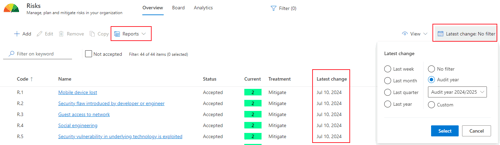
For your risk assessment, a new risk report is available that summarizes all changes made to risks in a certain period. To support making a selection, a new column Latest change is available in the list of risks. You can filter on this column by changing the period for the latest change. This way, you can easily create a report with risks that have been changed in the current audit year for example.
Task assignment improvements
1. Everyone can assign tasks
In previous releases, users without a management license could not freely assign tasks to other users due to the authorization rules. Based on your input, we decided that all users are now free to assign tasks to everyone. This way, teams can divide work more easily. In combination with the new role bases access control features, we think we created a powerful way for teams to handle their tasks and even provide better authorization.
2. Tasks can be assigned to multiple users (teams)
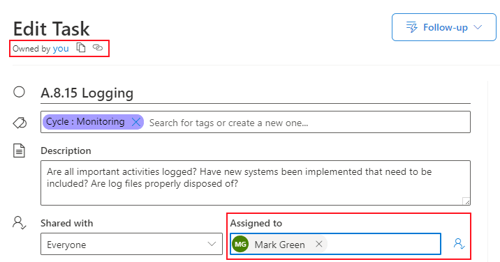
For Business and Premium subscriptions, you can ‘share’ tasks with groups and teams, effectively assigning these tasks to multiple users. These users can view and handle them as a team, dividing the workload. There is still 1 user (Assigned to) who is currently working on the task. To make use of this functionality, please refer to the new role based access feature.
3. Tasks have an owner.
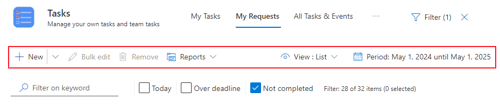
The owner of tasks can now be changed. Previously, the ‘owner’ was implicitly set to the user who created the task. You can now change the owner and see who created the task in the changelog. The owner is useful for tracking tasks that you’re not handling yourself. You can use the tab ‘My requests’ for this. The owner can also be updated in bulk and can be set on templates to provide a default for new tasks.
In addition, uses without a management license now also have the tab ‘My requests’ (next to My tasks) to track the tasks they own.
Task view improvements
The tasks views, which are used in many places, are made more consistent in functionality for all users.
1. All views have the option to select columns to display. Extra columns have been added to display the current checklist status and related standards (based on related requirements and controls).
2. All views (Except My tasks) have the option to filter based on a period.
3. All views can handle bulk edits. Some properties may not be available based on authorization.
4. All view have filters and reports.
5. Tasks details can be hidden. To provide a more clean task view, users can choose to hide the task details. When hidden, the task opens with the checklist or custom form, if available.
We created new knowledge base articles with all the details.
Improved tag filters for tasks
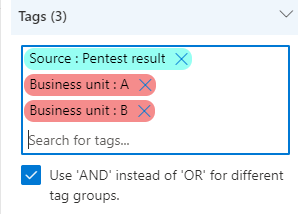
You now have the option to filter tasks on tags with the ‘AND’ operator. Previously, when you added multiple filters for tags, all tasks where shown that had any of the selected tags (‘OR’). Now you can enable an option to search for tasks that have all the selected tags (‘AND’). This options applies to tags in different groups. If you add tags with the same group – for example Priority : low and Priority : high, the ‘OR’ operator is still applied. This setting is saved independently for each user. More information and example can be found here.
Management of Classifications has moved to Settings
Based upon your input, we decided to move the management of Classifications to Administration / Settings / Classifications. Classifications are in fact configuration used for assets and risks. Previously this section was shown as a tab next to Assets. Now this section has a more intuitive place and is better authorized.
Approval for owners
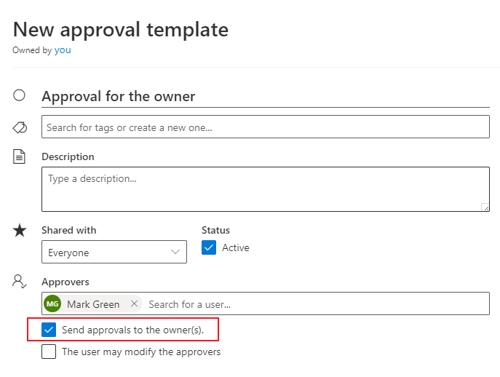
You could already choose an owner for items in the library. This owner is now used as a default for approvals when no previous approval exists. In addition, you can select an option in the approval template to send the approval to the owner of the item (dynamically). In the example below, when the template is applied, the approval is send to Mark Green and the owner(s) of the library items. When the owner is a custom role, the approval is sent to all user in that role with a maximum of 5.