New features in release 4.1.0
- Global Search.
- New risk status ‘Archived’.
- Improved replacing documents in the library.
- ‘Concept’ and ‘Published’ status of documents.
- Bulk copy of risks.
- Navigation improvements.
What’s next
- Many improvements that you requested.
- Keep it coming 😉
- Microsoft Planner.
- View your tasks in Microsoft Planner.
- Microsoft Copilot.
- Please let us know what you want to do with Copilot and ISOPlanner. We’re happy to discuss your business case.
Global Search
You might already have noticed the new search bar at the top of the screen. Here you can quickly find anything in ISOPlanner. Just type what you’re looking for and ISOPlanner shows you the top ranked results. You can also enable searching in SharePoint which greatly enhances search results by searching your SharePoint documents and relating them to search results in ISOPlanner.
Right next to the search bar we added a global filter for standards if you have activated more than one standard. In this case, you can filter on a standard and most views are automatically filtered on that standard.
Please read our new knowledge base article about searching and share it with your collegues.
New risk status ‘Archived’
This new risk status might come in handy when a risk no longer applies to your organization. It can also be the case that this risk has become obsolete and is replaced with another risk. You can now change the status of the risk to ‘Archived’ or just drag and drop the risk to the ‘Archived’ lane on the board.
Improved replacing documents in the library
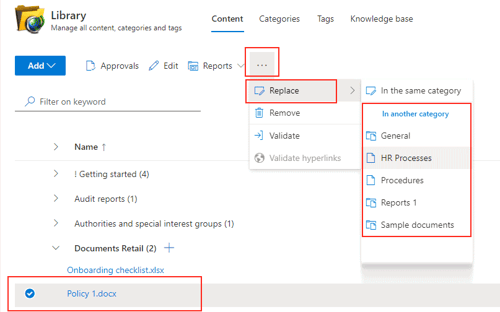
When you selected a document in the library, you could already replace the document with a document in the same category. We extended this feature to allow you to replace a document with a document in another category. This might be useful when you want to switch to another type of document. You can replace a web based policy in SharePoint with a Word document for example. All related items are preserved.
‘Concept’ and ‘Published’ status of documents
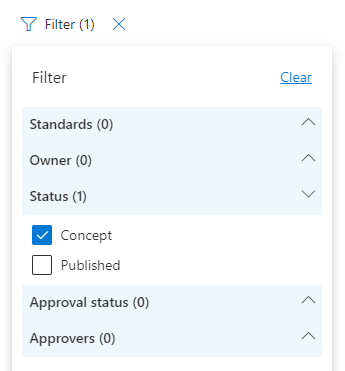
In the library, you now can filter on statusses ‘Concept’ and ‘Published’ when the version information of the category is enabled. This can help you get more insight in the document management process. Together with the approval status (Business subscriptions) you can more effectively make use of SharePoint as a document management system. SharePoint needs to be configured to enable the ‘Concept’ status.
To effectively implement the document management process or to improve it, we have created an elaborate article about the different stages of document life cycle management. Please read more about it here.
We also added a feature to publish document that are in concept. This already could be done automatically when using an approval workflow using Power Automate but now it can be done manually by selecting the document and clicking Edit.
Bulk copy of risks
When you select more than 1 risk, the Copy button changes to ‘Bulk copy’. This allows you to easily copy multiple risks. In addition, you can assign a tag to the newly created risks for easy identification.
Navigation improvements
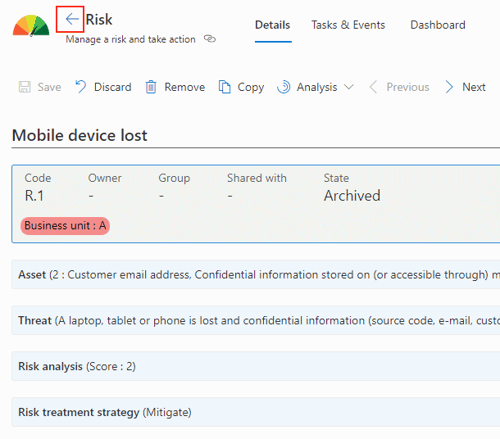
We decided the remove the breadcrumbs at the top of the screen in favor of a new button to quickly get you back the list of items. When you used the breadcrumbs a lot, this can be a change to get used to but we’re think that this new solution is easier to understand and quicker to get to.
When you navigate from a list (processes, objectives, KPIs, requirements, assets, risks or controls) to an item in that list, you now can quickly to back to the list by clicking the ‘Back’ button at the top of the view, as seen in the screenshot below.