
New features in release 4.2.0
- Status migration of processes, objectives, requirements and controls.
- Bulk update of control applicability reason.
- Bulk update of risk status.
- Automatically create a form based on a checklist.
- Configure a folder within a document library for easy upload.
- Import data in organizational units.
What’s next
- Microsoft Planner.
- View your tasks in Microsoft Planner.
- Microsoft Copilot.
- Let AI assist you with common tasks like creating a risk threat description or creating a checklist for a task.
Status migration of processes, objectives, requirements and controls
The PDCA status which could be applied to processes, objectives, requirements and controls has been replaced with new ones that are more specific and clear.
For processes, requirements and controls
1. To do
2. Designing
3. Implementing
4. Implemented
For objectives
1. To do
2. Designing
3. Monitoring
We migrated the statuses for you based on the tables below.
Process mapping
Plan -> To do
Do -> Implemented
Check -> Implemented
Act -> Implemented
Objective mapping
Plan -> Designing
Do -> Monitoring
Check -> Monitoring
Act -> Monitoring
Requirement mapping
Plan -> To do
Do -> Implemented
Check -> Implemented
Act -> Implemented
Control mapping
This mapping depends on the ‘Implementation status’ field.
1. When ‘Implementation status’ is set to ‘Yes’ -> Implemented
2. When ‘Implementation status’ is set to ‘In progress’ -> Implementing
3. When ‘Implementation status’ is set to ‘Auto’ ->
Plan -> Implementing
Do -> Implemented
Check -> Implemented
Act -> Implemented
Implementation status field
After this migration, we removed the ‘Implementation status’ field. It was no longer needed. Controls now only have 1 status field which makes managing it more easy.
Audit trail
The status migration is logged in the audit trail of the process, objective, requirement and control.
Monitoring rules
For controls, we also removed the business rule that ‘the implementation is done only when a tasks in scheduled in the annual plan’. In many cases, it is best practice but not mandatory to schedule a monitoring task in the annual plan. This also means that controls that had PDCA status of D, C or A and did not had a task scheduled now have status Implemented. We added a new filter ‘Monitoring’ to allow you to filter out those tasks that are not scheduled yet.
Statement of applicability
The status of controls in the statement of applicability is not changed except when you’re currently actively implementing (not certified yet) the standard. In this case, more controls could be on status Implemented than before due to the removed business mentioned above (monitoring rules).
Analytics
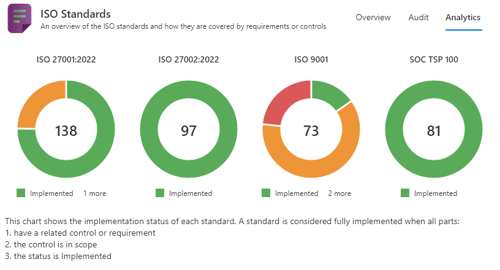
On the dashboards and analytics tabs you can see the implementation status of your standards. The changes in status and the above mentioned monitoring business rule have a slight impact on these pie charts. First, the status names are different and second, the 4th business rule below the charts is removed. Because of this, more controls could be marked ‘Green’.
Bulk update of control applicability reason
It is now possible to filter on applicability reasons in the Control menu and update the applicability in bulk. When you choose ‘Out of scope’ you can add a reason letting you set controls out of scope in bulk.
Bulk update of risk status
It is now possible to update the status of a risk in bulk.
Automatically create a form based on a checklist
Forms have the following benefits over checklists:
1. You can mark a checklist item as required.
2. You can add instructions and attachments to a checklist item.
3. You can see the results over time through the underlying KPIs.
.. and more.
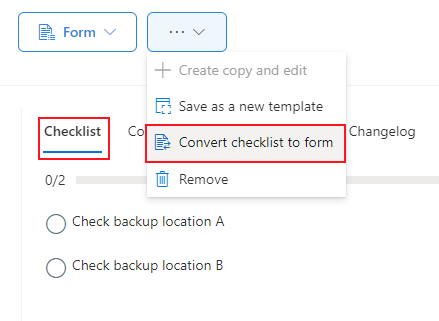
Converting an existing checklist to a form has been made more easy. Instead of creating a new form with KPIs manually, this now can be done automatically. This is most useful for template where the form is re-used for each tasks. Open the template and choose ‘Convert checklist to form’ from the menu.
Configure a folder within a document library for easy upload
You can now configure attachments on a form with a specific folder (within the chosen library category) so that users always upload documents in the same folder. This features allows for more control over upload locations and you don’t have to create a library category for each location.
Import data in organizational units
Fore Premium subscriptions, we added a new import method to roll-out configuration data to other organizational units. Instead of copying the whole organizational unit, it is now possible to add data to an existing organizational unit without overwriting it. This is very useful to roll-out default configuration like KPIs, forms, templates and tags that all units should use.