New features in release 5.2.0
- Preview: Microsoft Planner integration
- Import of Outlook emails in the library
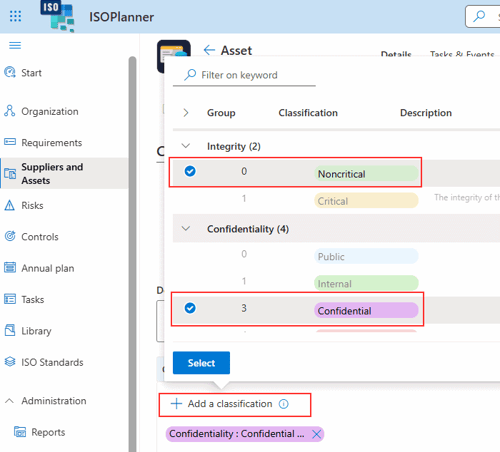
- Multi-select for classifications
What’s next
- Integration with Microsoft Purview, Intune en Defender for Cloud.
- Privacy module including improved processing register.
Preview: Microsoft Planner integration
Note: this feature is currently in Preview and some functionality may not work yet or will be changed in a future release.
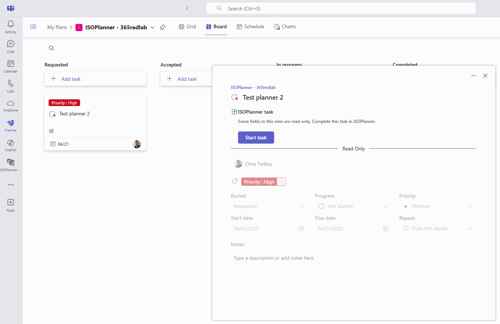
Tasks can now be synchronized to Microsoft Planner. The integation can be enabled on our integration page, which is partly redesigned. Permissions need to given to enable ISOPlanner to manage tasks and business scenarios. These permissions are application permissions because ISOPlanner needs to manage the integration in the background, without a signed-in user. For example, tasks in a recurring series can be automatically generated.
App-powered tasks is a new concept of Microsoft Planner. It means that another app (ISOPlanner) can send tasks to Microsoft Planner with certain additional business rules (Business scenarios). The result in the current integration is that all tasks in Microsoft Planner are read-only and you can edit them using the ISOPlanner user interface which enforces rules about authorization, documents and checklists.
At Microsoft Planner, this feature is also in Preview. We are working closely with Microsoft on this topic. You can read more about App-powered tasks here.
After you enabled the integration and have given the permissions, you can choose teams and groups to synchronize tasks with. These groups must first be imported in ISOPlanner under Administration / Teams and Groups.
For Basic subscriptions, you can choose 1 group where all tasks are sycned to, For Business and Premium subscriptions, you can choose a default group (for tasks assigned to Everyone) and choose a group for Sharing Permissions which you can manage under Administration / Users / Permissions.
When the tasks are synced with Planner, you can handle these tasks seamlessly within Planner with the ISOPlanner user interface. To enable this, users must have the ISOPlanner Tasks app installed.
Note: At the time of this writing, our ISOPlanner Tasks app for Teams is available in the Teams app store but is being re-certified for Planner integration and might not work yet as expected. When opening a task from Planner, you might get a message that the link is not available, depending on your tenant and region.
Read more about the Planner integration in our knowledge base.
Import of Outlook emails in the library
It is now possible to import email messages from Outlook in the ISOPlanner Library. For example, you might want to add an email message to a task as evidence. In Outlook, select the email message and choose Download from the More Options (…) menu in the email. Both EML and MSG formats are supported. Now you can upload these files to a task as usual. A preview of the email in the library is supported.
Multi-select for classifications
Adding classification to assets or selecting classifiations as a filter can now be done with multi-select, making this process faster.