New features in release 5.3.0
- Search option when selecting documents
- Improved filters for risks and controls
- Extension of report “Control specification”
- New chart of the monitoring task status for requirements and controls
- Option to show user photos instead of initials
- Improved task import
What’s next
- Integration with Microsoft Purview, Intune en Defender for Cloud.
- Privacy module including improved processing register.
- User read confirmation on documents
- More AI features
Search option when selecting documents
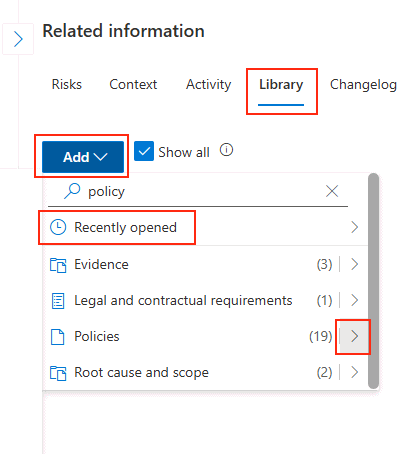
When you go to the Library tab to link documents to controls, risks and tasks for example, you can now search for a document. The search results contain the categories with the number of documents found for your keyword. You can directly add these documents by clicking the right arrow button next to the number of found results.
This works for documents that are already added to the ISOPlanner library. You can still browse the full SharePoint content by clicking on the category.
Next to searching, you can also add recently opened documents.
Improved filters for risks and controls
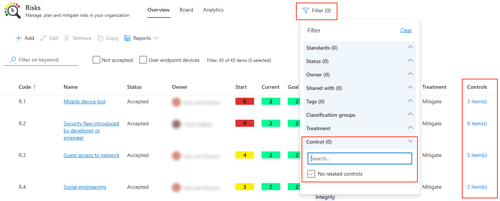
In the overview of Risks, we added a filter for a specific control and the option to show risks that have no related control. In addition, we added the number of related controls in the grid. When you click on this, you navigate to the overview of controls and you see the related controls.
In the overview of controls we added the same options to the filter: you can filter on a specific risk and an option to show controls that have no related risk. Also, the number of related risks is shown in the grid.
This way, you can easily see which risks have no related control and which controls have no related risk.
Note that these new filters have replaced the lists on the Analytics tab in the Controls menu.
Extension of report on control specifications
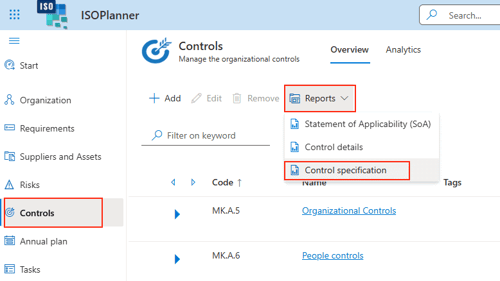
The report “Control specification” has been extended for the Excel export. We added columns for owner, group, applicability and a list of related documents with links to SharePoint.
After opening the Excel sheet, you’ll notice a message about the “secured view” which disables external links by default. You have to enable editing mode before the document links are shown.
Note that only the Excel export has these new columns because the Word and PDF exports have a limited width.
New chart of the monitoring task status for requirements and controls
You can now more easily check which requirements and controls have a related monitoring task in the Annual Plan.
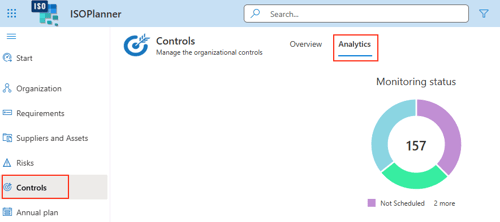
In the menu Requirements and Controls, on tab Analytics, we added a new pie chart that indicates how many requirements and controls have a related monitoring task and which of them are directly linked or linked through a parent requirement or control.
You can click on a segment in the pie chart to navigate to the overview and enable the corresponding filter to show the controls and requirements.
Option to show user photos instead of initials
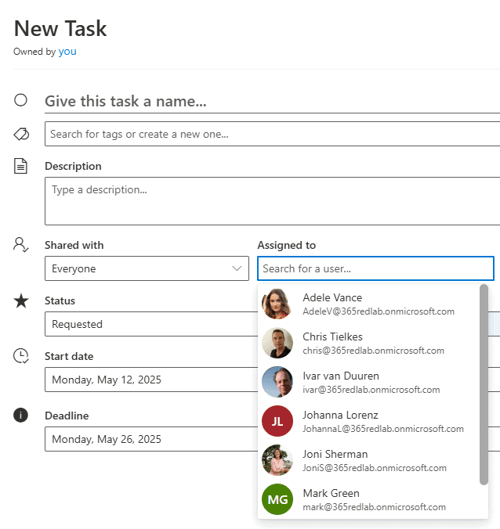
Many items in ISOPlanner have an owner (like risks and controls) or an assignee (tasks). Previously, the initials of that person were shown before the name. Now it is possible to show a photo of the user, making the person more easily recognizable.
Enable the “User photos” option in Administration / Integration / Microsoft Entra ID. Of course, photos must be available in your Microsoft Entra ID for this to work.
Your IT admin can manage user photos according to this article.
Improved task import
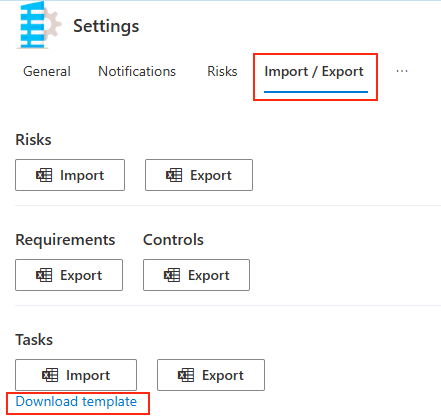
It is now possible to import all kinds of tasks including their deadline. You can now import one-time tasks, tasks in the Annual Plan, events and templates. You can also specify the deadline date and time. Please download the task import template and look at the comments for each column for the exact specification.