New features in release 5.5.0
- New privacy module for GDPR compliance (Preview).
- Image support for SharePoint page preview.
- New flexible risk matrix configuration.
- Added creation date to risk overview.
- Ability to search on Id and Code in Context tabs.
- New email notifications for task owners (overdue and completed).
- New dashboard for managing multiple organizational units (Premium).
- Moved Risk matrix and Classification settings to tab Modules.
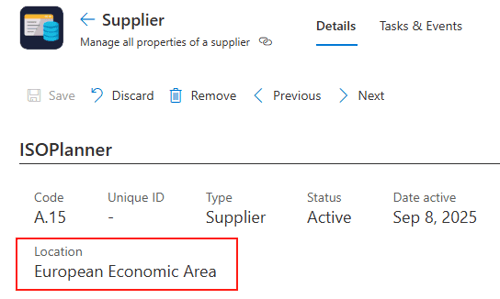
- Ability to register Asset locations.
Larger features we’re working on
- User read confirmation on documents
- Integration with Microsoft Purview, Intune en Defender for Cloud.
- Second iteration of the privacy module
New privacy module for GDPR compliance (Preview)
We’re very excited to present the new Privacy module which helps you gain better control over your GDPR legislation requirements!
1. No more Excel sheets needed. All GDPR required fields are available.
2. Easy and flexible entry of your processing activities.
3. Duplication detection with AI for various fields.
4. Integrated with the Asset module for data (information) and processors (suppliers).
5. Integrated with the Risk module and related controls.
6. Integrated DPIA checklist.
7. Integrated with the library for your data processing agreements and more.
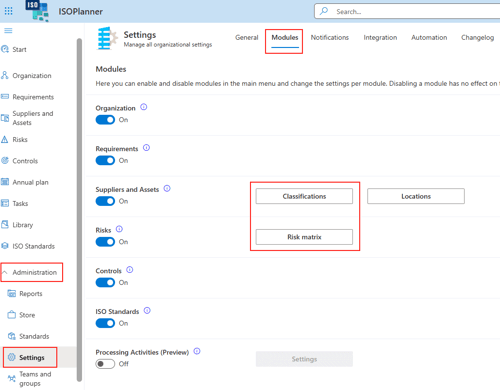
You can enable the module by going to the Administration / Settings menu, click on tab Modules and activate the Processing Activities module. You’ll see the new module appear in the main menu.
This module is currently in Public Preview. We may change the licensing requirements in the future. We are working on new knowledge base articles, if you have any questions or feedback, please contact our Service Desk.
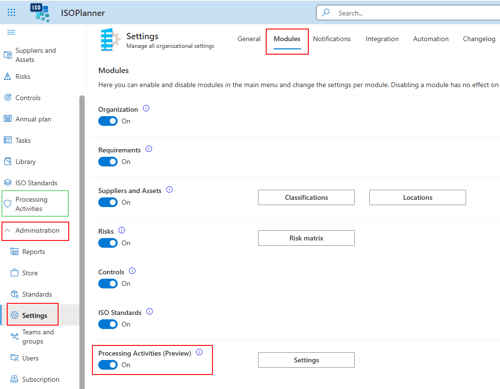
Image support for SharePoint page preview
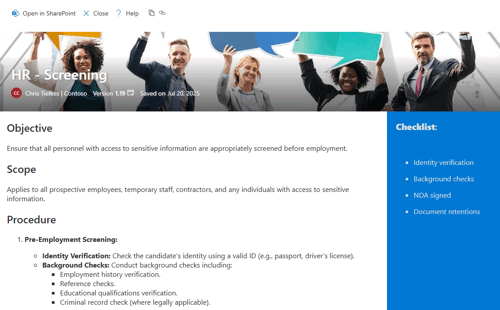
We finally added support to show Images and more in the SharePoint page preview. This was – unfortunately – not possible earlier because Microsoft did not support it. Your beautifully designed pages now show up in ISOPlanner as well!
1. Full layout in sections and columns.
2. Images in sections and banners.
3. Banner styling with focus point, gradient, text above title.
4. Zoom to page width.
5. Header includes document owner, version and last changed date.
Not everything is possible to show:
1. Other web parts (only text, images and banners)
2. Banner layout other than ‘Image and title’.
3. Other banner properties.
If your layout is not supported yet, please let us know and we will check if there is support by Microsoft (Graph) and let you know the implementation timeline.
Here an example of a page with a custom banner and a vertical section containing a checklist.
Tip: In Microsoft Teams, you can activate our ‘ISOPlanner Library’ app from the Microsoft store for free. Set-up the ‘Knowledge base’ in the ISOPlanner library to publish important documents to your colleagues.
New flexible risk matrix configuration
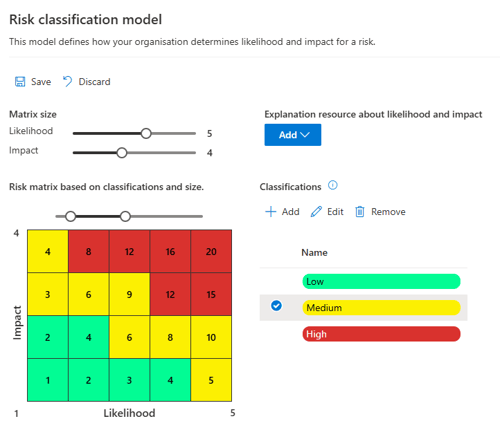
The Risk matrix configuration is moved to tab Modules in the Administration / Settings menu. Click on the Risk Matrix button to open it. We made the configuration of the matrix more flexible.
1. Likelihood and impact can now be scaled independently.
2. Select a classification and ‘paint’ in the matrix.
3. Use the slider above the matrix to easily expand the selected classification.
An example is that ‘risk appetite’ for impact can be lower than for likelihood.
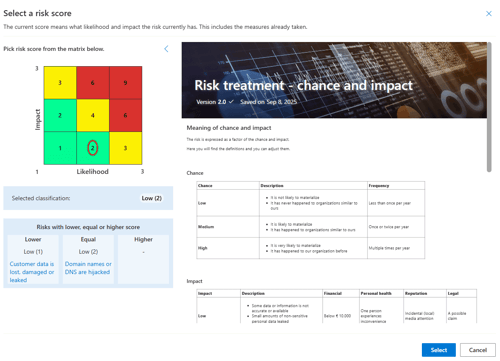
See the example below which was not possible before. Impact 3 and likelihood 1 is now Medium while impact 1 and likelihood 3 is Low. Just select the classification and click in the matrix to ‘paint’ how you want it to be.
Further, the risk score selection has been improved. The layout is improved and the document with the policy has been integrated into the view. The selected score has now a clear red circle around it.
Added creation date to risk overview
The risk overview now contains a column with the creation date of the risk. This can be helpful to quickly identify newly created risks. If you don’t need it, you can just hide the column with the View -> Select columns button.
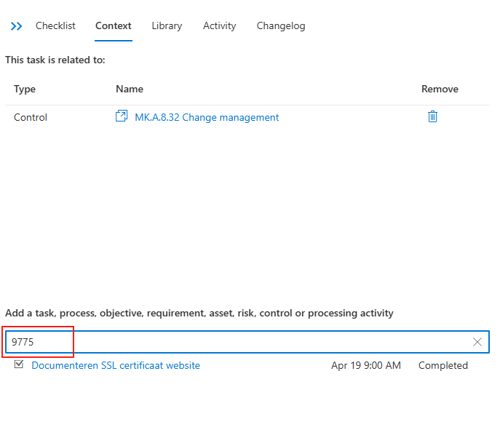
Ability to search on Id and Code in Context tabs
When adding items to the Context tab of another item, you can now search on the Id and Code (if available) of the item. For example, when you want to add a task to another task, you can type (or paste) the Id. This is especially useful for tasks because there can be multiple tasks with the same name. In addition, you get the creation date and status in the search results to quickly pick the correct one.
New email notifications for task owners
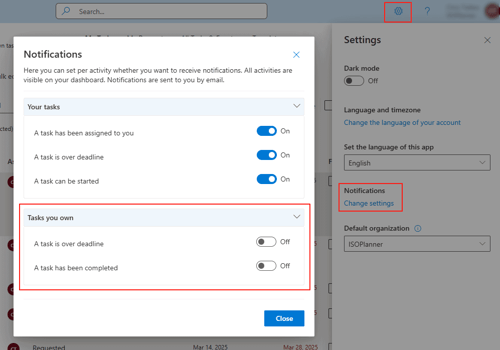
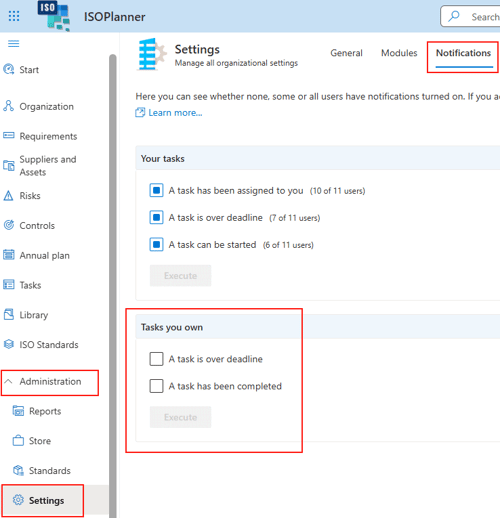
There are new email notifications available for task owners. You can configure these for yourself or for all users.
1. Task owners can get an email notification when a task is overdue.
2. Task owners can get an email notification when a task is completed.
The notification for overdue tasks did already appear on your dashboard in the widget ‘Action required’. The completed task notification appears in the widget ‘Recently completed tasks’. You can open them directly from your dashboard, check the results and archive them when done.
Personal email notification settings
Administrator settings to override the email notifications for all users.
New dashboard for managing multiple organizational units
When adding a new widget to your dashboard, you’ll notice a new category when you have a Premium subscription: Organizational unit. This category contains 8 new widgets that can display data from a selection of organizational units. You must have permissions for each organizational unit before the data is shown. This means you must have one of the following roles in the organizational unit: (Organization) Admin, Manager, Consultant.
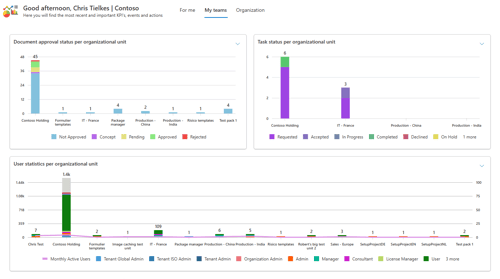
The widgets are designed for a CISO role/team to gain insight into multiple organizational units without logging into the organizational units themselves. By clicking in the charts, you can drill down directly into the organizational unit for more details.
The charts can give interesting data like:
1. Risks that have a goal score lower than the current one but no open controls.
2. Users that are owner but are not active.
3. Number of active users per month.
4. Changes of risks and controls.
5. Number of risks per owner.
and much more.
The following widgets are available
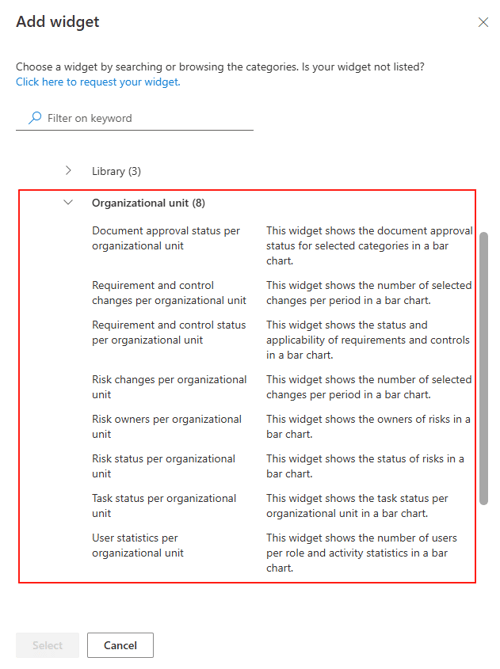
These widgets have also a new property that allows you to set the width to 2 or 4 times the normal width.
Moved Risk matrix and Classification settings to tab Modules
Because the number of tabs in the Administration / Settings menu was growing too much, we moved the settings tabs for Risks and Classifications to the Modules tab.
Ability to register Asset locations
An asset has a new property: Location. This is an optional property and you can compile a list of locations yourself. Each location is linked to a ‘Data zone’ which is important for suppliers for example. The new GDPR Privacy module makes use of this location to automatically determine whether your need to take more measures when data is transferred outside of the European Economic Area (EEA). You can also use this location to just register where your assets are. Our AI Assistant helps you (when enabled) to prevent entering duplicates.
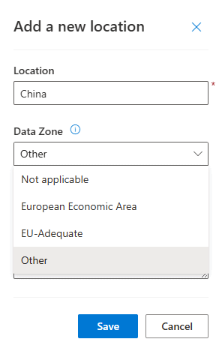
You can find the full list of locations in the Administration / Settings menu, tab Modules and button Locations.