
These actions are applicable for all elements which contain hyerarchie: controls, requirements, processes, framework, suppliers and assets...
Open up a hierarchy
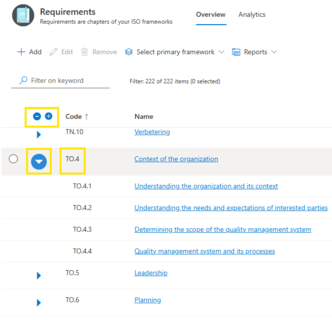
A list of items that have parent-child relationships have options to open/expand or close/collapse a set of items. This action can be done by clicking on the code of the head item or the icon next to it.
If you wish to expand/collapse the whole list, use the icons "-" and "+" in the main bar.
Search and filter
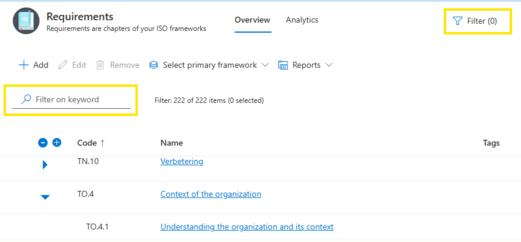
The "Filter on keyword" field enables searching for a specific term in the whole list.
Option "Filter" is available in every menu of ISOPlanner. The filter options may vary, depending on the menu but in every case it helps you to filter the data very easy and if you create a report while one or more filters are applied, the report will take into considerations applied filters.
Add, Edit and Remove
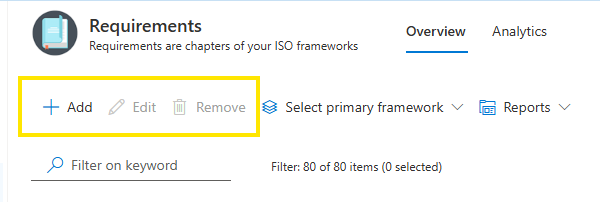
With "Add" a new item can be added to the list. The "Edit" button is active when one item is selected. "Remove" can be applied to one or more selected items. Before the data is being removed a confirmation window will appear to confirm the deletion since the action is not reversible.
Bulk Edit
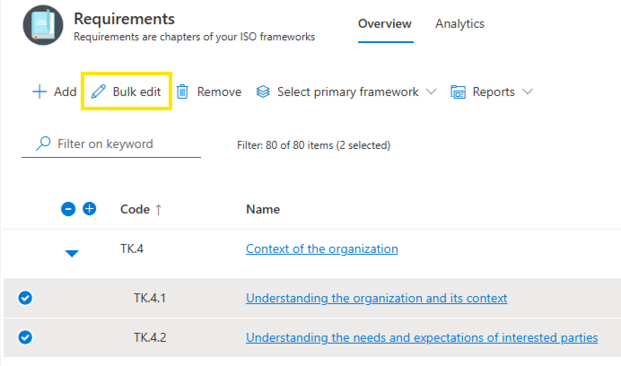
Some actions can be applied on multiple items at the same time. Options available can differ, depending on the menu where the changes are being done.
If you wish to change or create copy of multiple items at once, when choosing two or more items, Button Edit changes into Bulk Edit and allows changes on mulitple elements at once.