New features in release 3.5.0
- New email notifications.
- Module permissions for normal users and consultants.
- New Audit view.
- Ability to assign Standards to Library items.
- Library read statistics.
- Various usability improvements.
New email notifications
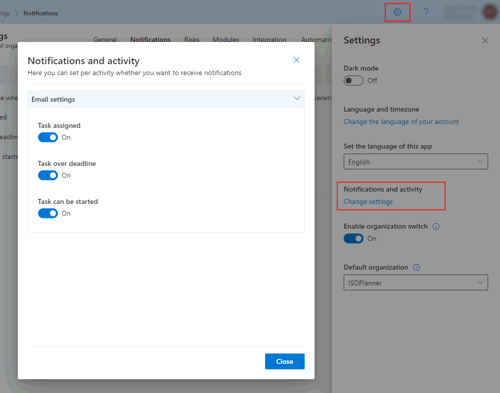
You can now opt-in for receiving new email notifications:
- Task over deadline.
- Upcoming tasks.
Note that the email notification for Task assignment is enabled by default because users previously always received this notification.
An administrator can change the notification settings for the entire organization and users can enable notifications for themselves.
Administrators can change the settings here.
User can open their personal settings panel and choose ‘Notifications and activity’.
Module permissions for normal users and consultants
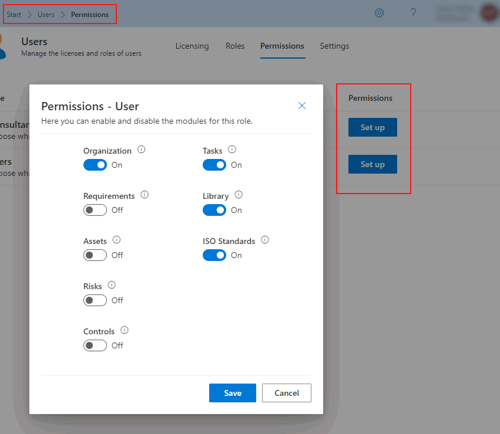
For users that have roles ‘Normal user’ or ‘Consultant’, permissions can be granted or revoked to access certain modules like Assets, Risks and the Annual Plan. Navigate to Administration / Users tab Permissions to configure the enabled modules for each role.
New Audit view
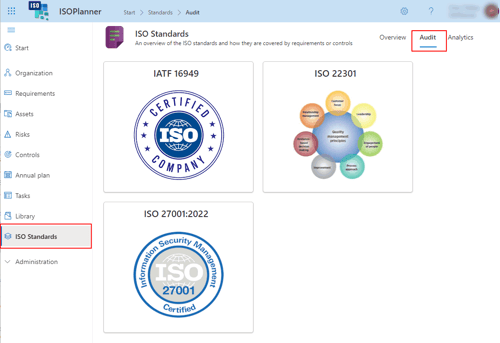
To make browsing your Standards easier, a new Audit view is added as tab to the ISO Standards main menu. It can be used for uses to assist in auditing or as a reference book. The view starts with selecting a Standard. After selection, the requirements and controls are shown. By selecting one, the details are shown on the right, including implementation and library content.
Note that the images displayed for each Standard can be adjusted by editing the Standard here and uploading a custom logo.
Note that we aim to extent this view with more information useful for auditing like timelines and task evidence. Any feedback is appreciated!
Ability to assign Standards to Library items
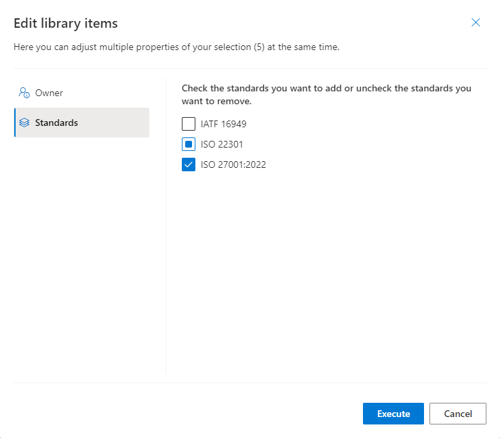
Documents and SharePoint pages can be relevant for multiple Standards. In the Library, a new column is added to indicate which standards are relevant for each item. The default setting is ‘All standards’. You can edit these settings with the Bulkedit feature. The new Audit view will only display Library content for the selected standards (or all Standards). You can also simply filter the content of the library on one or more Standards.
Library read statistics
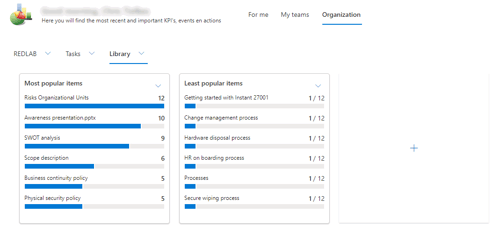
ISOPlanner now registers who opens which documents and SharePoint pages. Statistics are kept for documents and SharePoint pages that are opened through ISOPlanner itself, the Outlook add-ins and Teams apps. You can add a widget to your Dashboards to show these statistics. You can show which items are opened most or least and filter by Library category.
In the future we aim to add a ‘Read confirmation’ option for users so that they indicate that they have read the item by clicking a button in the Teams Library app or other channel. We would appreciate feedback on the channel you would prefer!
Various usability improvements
We implemented various usability improvements that were requested by you. Many thanks and please keep creating tickets for things you like to be added or improved 😊.
1. The view menu is moved to the right of the screen. This change improves the readability of the command bars. All command bar buttons that affect the view like choosing between list and board of a specfic period are placed on the right side. This is common UX best-practice.
2. Selecting visible columns is now also available for Requirements, Controls and the Library. Note that choosing columns affects the view and is implemented as a sub-menu of the View menu which is now placed on the right of the screen. We aim to implement this for tasks in the near future.
3. Editing single or multiple items has been streamlined throughout the application. When selecting 1 item, the button Edit is enabled and a panel is opened on the right of the screen to edit various properties of the item. When selecting multiple items, the label of this button changes to ‘Bulkedit’ and a form is opened to make the edits for your selection.
The most changes are made in the Library where this logic was not fully implemented. Now you can select 1 item in the library and edit the properties through the panel on the right.
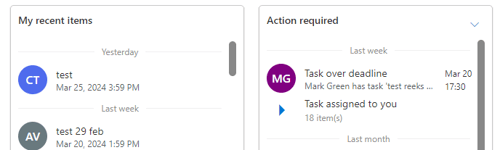
4. Widgets on the dashboard that show activities or tasks now indicate in which period the item falls like ‘Today, Yesterday, Last week and Last month’.
5. The Widget ‘Action required’ now shows items ‘collapsed’ when they have the same type and fall in the same period. When collapsed, instead of the assignment on the left, an arrow is shown to expand these items. This makes the widget more quickly to scan.