
Any changes made in this section need to be saved to be applicable. If you have made any changes but do not wish to save them, you can use the button “Discard”.
Company profile
This functionality enables you to (with the help of AI) collect the information on your company profile. You can enter the website of your company and than click on “AI” button to fill in the rest of the information. Data filled in will be in the default language of your ISOPlanner. This information can later be used for creating other documents.
Language
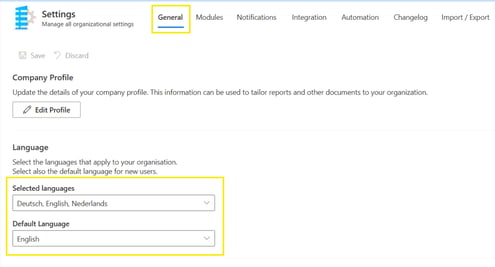
ISOPlanner is available in several languages: English, German and Dutch. It is possible to make more than one language available to users within an ISOPlanner environment, and to set one default language. These settings can be set and adjusted in the menu Administration / Settings / tab: General.
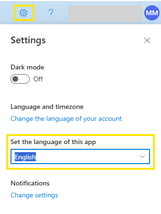
Each user has the option to set their personal settings, including the language preference. The options available depend on the above mentioned selected languages, determined on the organization level. Personal settings can be accessed through the gear-wheel on the upper right side of the interface. These settings can be changed any time. Changing the language does not change/translate the data entered by the customer, such as implementation text, task descriptions etc. It changes the language of the interface and if the standard you have active in ISOPlanner is available in the language you make the change to, the text of the standard will also change accordingly.
Working hours
Set the working days and working hours for your organization. These are used to determine the deadline of tasks. You can define the days, time and the time zone that you are in.
Audit cycle
The start of the audit cycle indicates when the audit of requirements and controls starts each year. Set up audit cycle is reflected directly in the Annual plan period. This is usually the month in which the external audit falls (phase-2 of your certification audit) falls. If you do not have an external audit, you can choose the audit cycle yourself, for example starting January 1st.
Custom logo
You can choose your own logo that will be placed on the navigation bar, to the left of ISOPlanner. The dimensions are a maximum of 48×144 pixels, the maximum size is 8000 bytes and the background of the .PNG format must be transparent.
Ad settings
By activating this option, relevant advertisements of services are shown with standard requirements and measures. Only high-quality selected services are shown that are partners of ISOPlanner.