Risk classification model
This model defines how your organization determines likelihood and impact for a risk.
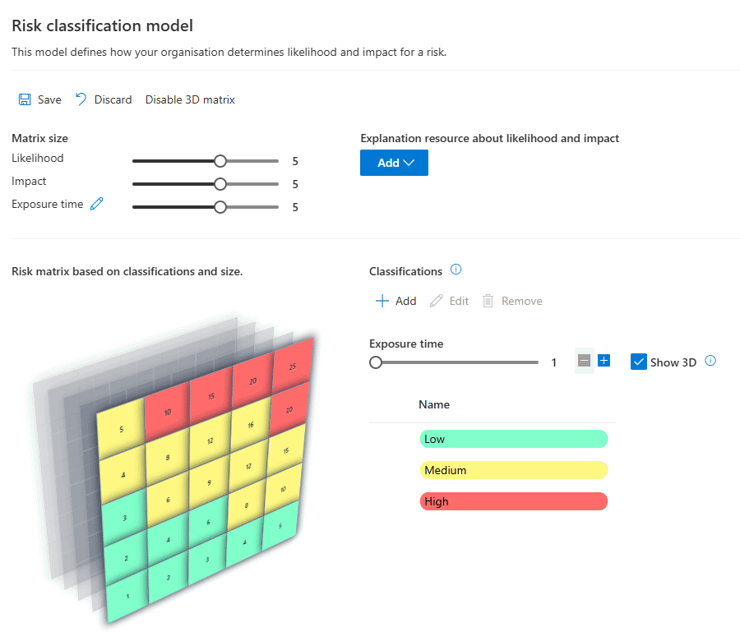
For Premium subscriptions, a 3rd dimension can be added. E.g. ‘Exposure time’ for ISO 13849
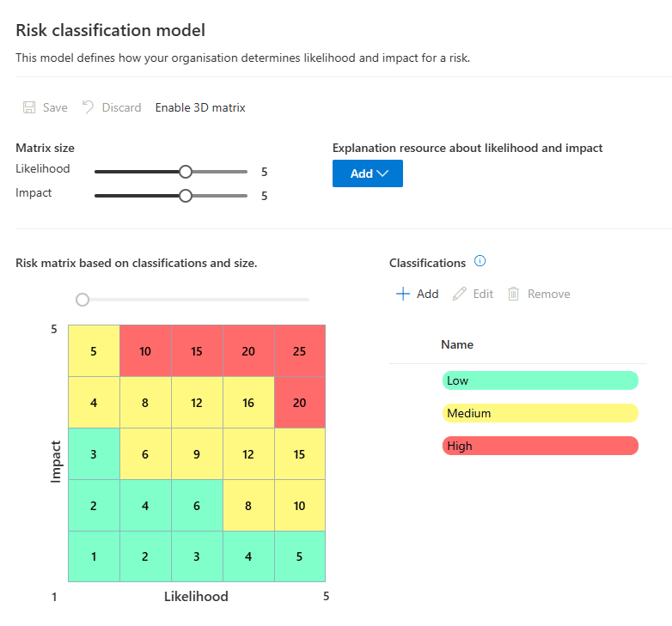
Use the sliders to change the matrix size. The minimum size is 3 by 3, maximum is 7 by 7.
Important: when the size of the matrix is changed, all scores of all risks will be adjusted relative to the previous size. Example: the probability and impact of a risk are 2 and 3. The size of the matrix is adjusted from 3 to 5. The probability and impact are then 3 and 5. It may be that a risk is placed to an adjacent classification by rounding the chance and impact.
By default, there are 3 classifications for risks: low, medium and high. Each of those classifications can be edited to change the following properties:
- Name
- Treatment term – within which time period should the risk be reduced?
- Financial impact
- Color
Apply a classification
You can apply a selected classification in 2 ways:
- Use the slider above the matrix to easily change the range of the selected classification.
- Click in the matrix to paint with the selected classification
Documentation
There is also an option to choose an explanation resource. This would be one of your own documents in the library that you can link here. This document typically contains information about what consequences certain classifications have like financial impact and examples and guidelines for users how to choose. This document is also shown in the risk details page when selecting a risk score.
3D Matrix
For Premium subscriptions
When the 3rd dimension is enabled, you can give it a name like ‘Exposure time’ and set the scale. The total score for each risk will now be calculated as Likelihood x Impact x Exposure time. You can now set-up the classifications for all values of this new dimension. Just drag the sliders or paint with your mouse in the matrix. In the risk details view, you also can set a score and in all views, the 3rd dimension is added.