
Overview
Where to find it in ISOPlanner: https://portal.isoplanner.app/admin/groupsHere you can add and remove groups and teams in Microsoft Entra ID. For each group and team, you can enable and disable the synchronization of their members with Microsoft Entra ID. The added teams and groups become available for:
- Authorization, as a member of Custom roles and Sharing permissions. (Business and Premium subscriptions)
- Tagging processes, objectives, requirements, controls and risks. (Basic subscriptions)
- Adding library content to a team and share this knowledge in the Microsoft Teams app. (Business and Premium subscriptions)
- Showing tasks of other groups and teams in the ‘My tasks’ overview (Basic subscription, other subscriptions have the Authorization feature which can do more.)
- Creating dashboards for Teams.
The synchronization feature is not available for Basic subscriptions
Synchronization
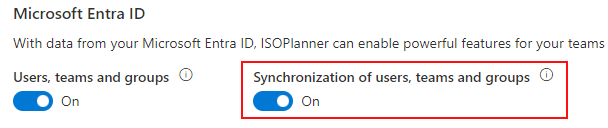
Synchronization needs to be enabled in the Administration / Settings / Integrations section. ISOPlanner asks permissions to read group members for the background service (ISOPlanner SVC Entra ID) because this service runs automatically every 24 hours.
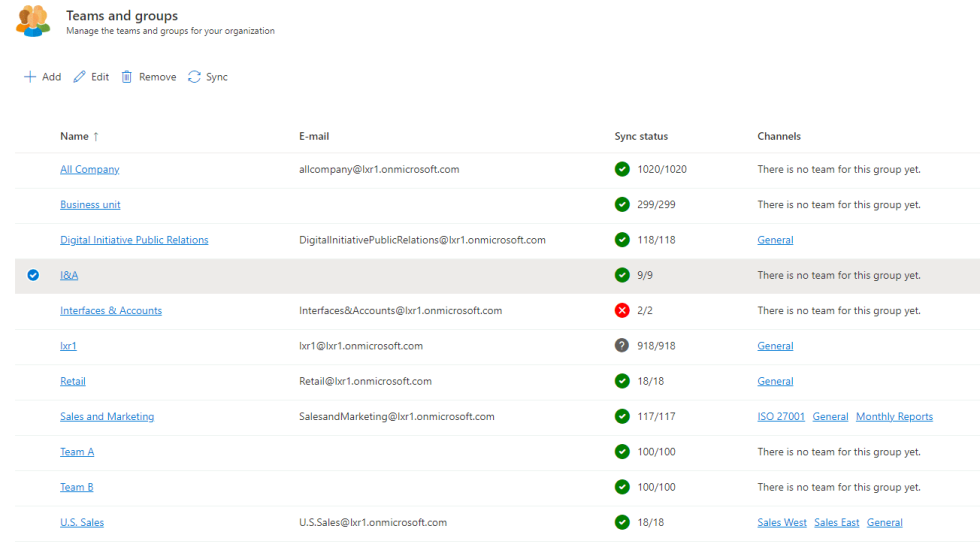
Synchronization is done each day but you can click the Sync button to manually synchronize. In the list, the status is shown (Green = Succes, Red = Error -> Hover over it to see an error message, Grey = Disabled) and the number of users that are synchronized versus the number of users in Microsoft Entra ID. When these users do not match, not all users are synchronized due to:
- An error.
- There are not enough licenses in ISOPlanner.
When this is the case, an email is send to all users in the roles Administrator and License manager.
Synchronization rules
- When a user is synchronized to ISOPlanner, a license is assigned to the user when the account is enabled in Microsoft Entra ID and there are free licenses in ISOPlanner.
- When an account of an user is removed or disabled in Microsoft Entra ID (e.g. after off boarding), the license is automatically disabled in ISOPlanner.
- When user details (name, email) are changed in ISOPlanner, details are not updated from Microsoft Entra ID.
- When a user is a member of a group (nested) and the group is a member of Custom role(s) or Sharing Permission(s), the user is granted permissions assigned to those Roles and Sharing permissions.
- When a license of a user is disabled in ISOPlanner and the account is still enabled in Microsoft Entra ID, the license is not enabled again at the next synchronization.
Resources